
Before writing a headline, a quiz question or the first screen of an onboarding flow, spend some time with the person who will read it. It helps to picture one person at the moment they arrive, rather than the whole audience at once.
Most teams know their audience in broad terms. They can say who buys, which industries sign up and which age groups follow the brand. That is useful for planning. It helps less when you are choosing the few words at the top of a page. Those words land with one person who has just searched for something, clicked an ad or opened an email, and who is trying to decide something specific.
This article works through that research step by step. It covers the difference between an audience and an avatar, where to find pain points in customers' own words, how to map them to what your brand offers, and how to carry that language into messaging and small digital assets such as quizzes, tools and template libraries. .
Audience and avatar: one group, one moment
An audience is a group of people who share a situation. An avatar is one person in that group at a specific moment.
The difference matters because messaging is read by one person at a time. An audience tells you who to reach. An avatar tells you what to say when you reach them.
The terms, by type of business
Different teams use different words for these layers, so it is worth setting them out once.
Audience research is the work itself. It means studying a group's situation, needs, words and behaviour. Everything below is something it produces.
An audience is a group of people who share a situation. It changes slowly, over months or years, and every kind of business uses the word.
An ICP, or ideal customer profile, is the kind of company that fits the product: its size, industry, setup and budget. It is a B2B and SaaS term, and it also changes slowly.
A persona is a role inside that company or group, with its goals, tasks, worries and part in the decision. B2B, SaaS, product and UX teams use it, and a persona usually holds for months.
A use case or trigger is the situation that makes someone start looking now. SaaS and product teams use these words, and they describe one buying or adoption moment.
An avatar is one person at one moment: their trigger, their own words, the decision they are making and what worries them. DTC brands and copywriters use the word most. Many marketers use "avatar" to mean the same as persona. In this article it means something narrower, one person at the point where they are deciding.
How the layers fit together depends on the business.
DTC. There is no company layer, so the steps are short: audience, then avatar.
B2B. One account holds several personas: the person with the problem, the person who signs off, and often the person who will use the product every day. Each has their own trigger and worries, so one company can need two or three avatars.
SaaS. A persona is "finance manager at a small multi-entity company". It stays the same for months. The avatar is that same persona at one moment: "month-end just took two weeks after we added a second entity, and I'm deciding between better spreadsheets and new software". In SaaS that moment is usually called a use case or a trigger.
Technical products. The person who evaluates the product, often a developer or an analyst, is not always the person who buys it. Their words come from documentation, forums and issue threads more than from reviews.
In SaaS this is usually called a persona or a use case. In DTC it is often called an avatar. In this article, what matters is the moment, not the label.
What goes on an avatar card
An avatar card needs four things.
- Trigger: what happened that made them start looking.
- Their words: how they describe it, copied rather than paraphrased.
- Decision: what they are deciding right now.
- Worries: what makes them hesitate.
Add where they arrive from if you know it: a search, an ad, a referral or an email.
One audience holds several avatars. Start with one. Demographics alone rarely change a headline. A trigger and a worry usually do.
Example scenario: a hair-care brand. Imagine a DTC hair-care brand that sells products and offers a free app. The audience is women noticing their hair thinning. One avatar is a woman a few months after having a baby who searched "hair falling out in clumps after baby". She is deciding whether this will pass or whether she should do something about it. She worries about spending money on products that don't help, and about anything that feels too harsh while she is breastfeeding.
Example scenario: finance software. Imagine a SaaS company that sells finance software to small companies with more than one entity. The persona is the finance manager. The avatar is that manager in the month after the company added a second entity, when the close suddenly took twice as long. They are deciding between better spreadsheets and new software. They worry about setup time and whether the auditor will accept the output.
A copyable card:
AVATAR CARD
Audience (the group that shares a situation):
Avatar (one person, one moment):
  Trigger: what happened that made them start looking
  Their words: how they describe it (copied, not paraphrased)
  Decision: what they are deciding right now
  Worries: what makes them hesitate
  Arrives from: search / ad / referral / email / not known yet
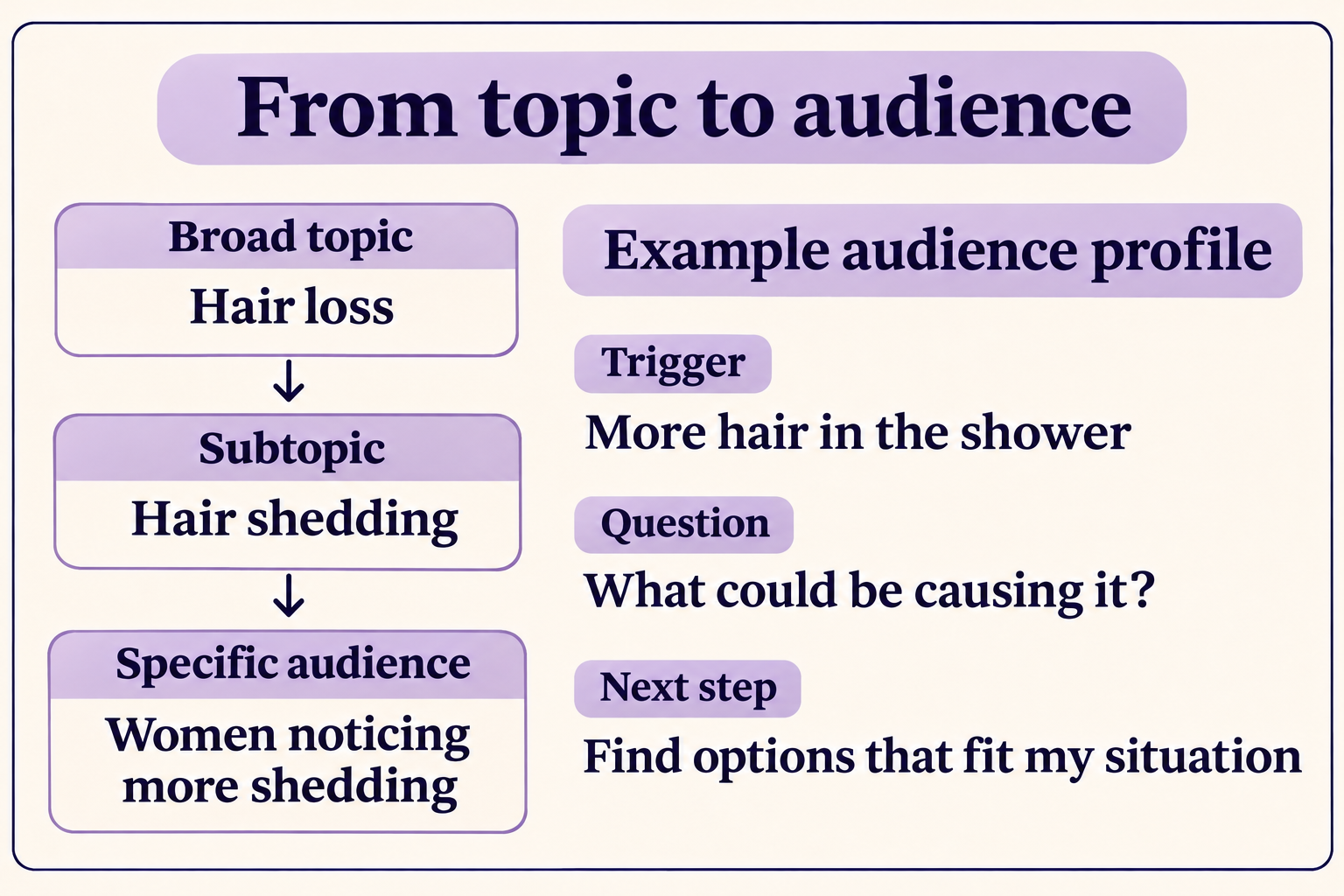
Exemplary breakdown of how we get from audience, topic to the right avatar and their characteristics
Pain points: where to find them, step by step
The card is only as good as the words on it. Work through these sources in order, starting closest to your own customers and moving outwards.
Step 1: Your own reviews and support
Start with what your customers already tell you. Reviews, support tickets, chat transcripts, sales call notes, cancellation reasons and free-text answers in quizzes or forms all carry the customer's own words.
Copy phrases word for word. "My hair is coming out in the shower" tells you more than a tag that says "hair loss". Note which moment each phrase belongs to: before buying, at the first use, or after a few weeks.
Step 2: Competitor reviews
Competitor reviews show what customers expected from similar products and where they were let down. Look at review sites, marketplace listings and app store reviews.
An AI assistant with web search can help you gather these faster.
You are helping me research customer pain points and objections for one
customer avatar, before I update messaging and small digital assets
(quizzes, tools, templates) across my website and product.

Product category: [e.g. thinning hair care for women / finance software
for small multi-entity companies]
My brand: [name or URL]
Competitors: [3–5 names or URLs]
Avatar: [who / what triggered the search / what they're deciding / what
worries them]

Search public customer reviews and discussions about these competitors
and the category: review sites (e.g. Trustpilot, G2, Capterra),
marketplace reviews, app store reviews, Reddit and forums. Prefer reviews
from the last 24 months.

Return a table with these columns:
1. Pain point (one line, in the customer's own words where possible)
2. Short verbatim quote (under 20 words, mark it [paraphrase] if not
   verbatim)
3. Source URL
4. Type: pain point / objection before buying / disappointment after
   buying / switching reason
5. How often it appears across sources (rough count)
6. Journey moment: search or ad / landing page / quiz or tool /
   recommendation / product or pricing page / onboarding or first use /
   retention
7. Words customers use for the problem (not product terms)

Then:
- Group the rows into the 5 most frequent themes.
- For each theme, suggest where it should appear in my journey and one
  line of copy that answers it without promising an outcome.

Rules: Only use sources you can link. Do not invent quotes or counts. Do
not include reviewer names or personal details. If evidence is thin for
a theme, say so.
Step 3: Forums and communities
Reddit, Facebook groups and specialist forums are where people describe a problem before they know which brands exist. That makes them the closest you can get to the trigger.
Read whole threads, not only the first post. The replies often show which worries come up again and which advice people trust.
Step 4: Search queries
Search queries show the trigger and the exact words, and which phrasing many people share. Look at autocomplete suggestions, the "People also ask" box, the queries in Google Search Console and your own site search.
Example scenario: finance software. A query like "month end close multiple entities spreadsheet" says more about the avatar than "finance software". It names the task, the situation and the tool they are using today.
Keep everything in one log
Put every phrase into one pain-point log, whichever source it came from.
PAIN-POINT LOG (one row per phrase)
Phrase (their words) | Source + link | Type (pain point / doubt before
buying / disappointment after / switching reason) | Journey moment |
Rough frequency | Our solution (not a feature) | Proof we can show
You can stop when new sources mostly repeat themes you already have. For one avatar, that often comes sooner than expected.
Keep reviewer names and personal details out of the log. Paraphrase forum posts unless the quote is short and public.
Mapping pain points to solutions, not features
Once the log has a few clear themes, map each one to what the brand offers. Work in this order: the pain point, what the person needs to believe, the solution, the proof you can show, and only then the feature that delivers it.
A feature answers "what does it do". A solution answers "what changes for me". Messaging built on features asks the customer to do that translation themselves, usually at the moment they are least inclined to.
Example scenario: a hair-care brand. The pain point is "I don't know if this is normal or if I should worry". She needs to believe the brand will be honest with her. The solution is help understanding common types of shedding, with gentle first steps and a clear note on when to see a doctor. The features are the quiz and a progress tracker in the free app.
Example scenario: finance software. The pain point is "month-end takes two weeks because I reconcile every entity by hand". They need to believe setup won't take longer than the problem. The solution is a repeatable close that follows the same steps each month. The feature is a set of multi-entity close templates.
Some pain points will have no matching solution. Those are useful too. They belong with the product team as evidence, not in the copy.
From customer language to messaging across touchpoints
A pain point is most useful when it carries through the whole journey. Take one and trace it from the first touchpoint to the product.
Example scenario: a hair-care brand. Follow "I don't know if this is normal" through the journey.
- Search result or ad. The hook uses her words: "Hair falling out after having a baby?"
- Landing page. The headline picks up the same worry and promises help understanding it, without promising regrowth.
- Quiz. The questions ask about timing and what she has tried, because those answers change the recommendation.
- Recommendation. "Because you said this started after your baby, we recommend starting with..." keeps her words in the reply.
- Collection or product page. It opens on products for her situation, not the full range.
- Free app. The first screen opens on the journey she chose, not a blank dashboard.
Ask two questions at each step. Are these still the customer's words? And is the promise from the step before kept?
When the journey moves into the product, the same thread runs through onboarding. The first screen, the first email and the first useful result should all speak to the reason the person signed up. That is the core of onboarding and activation work.
For the quiz part of this journey in detail, from the entry promise to the recommendation, see the quiz article.
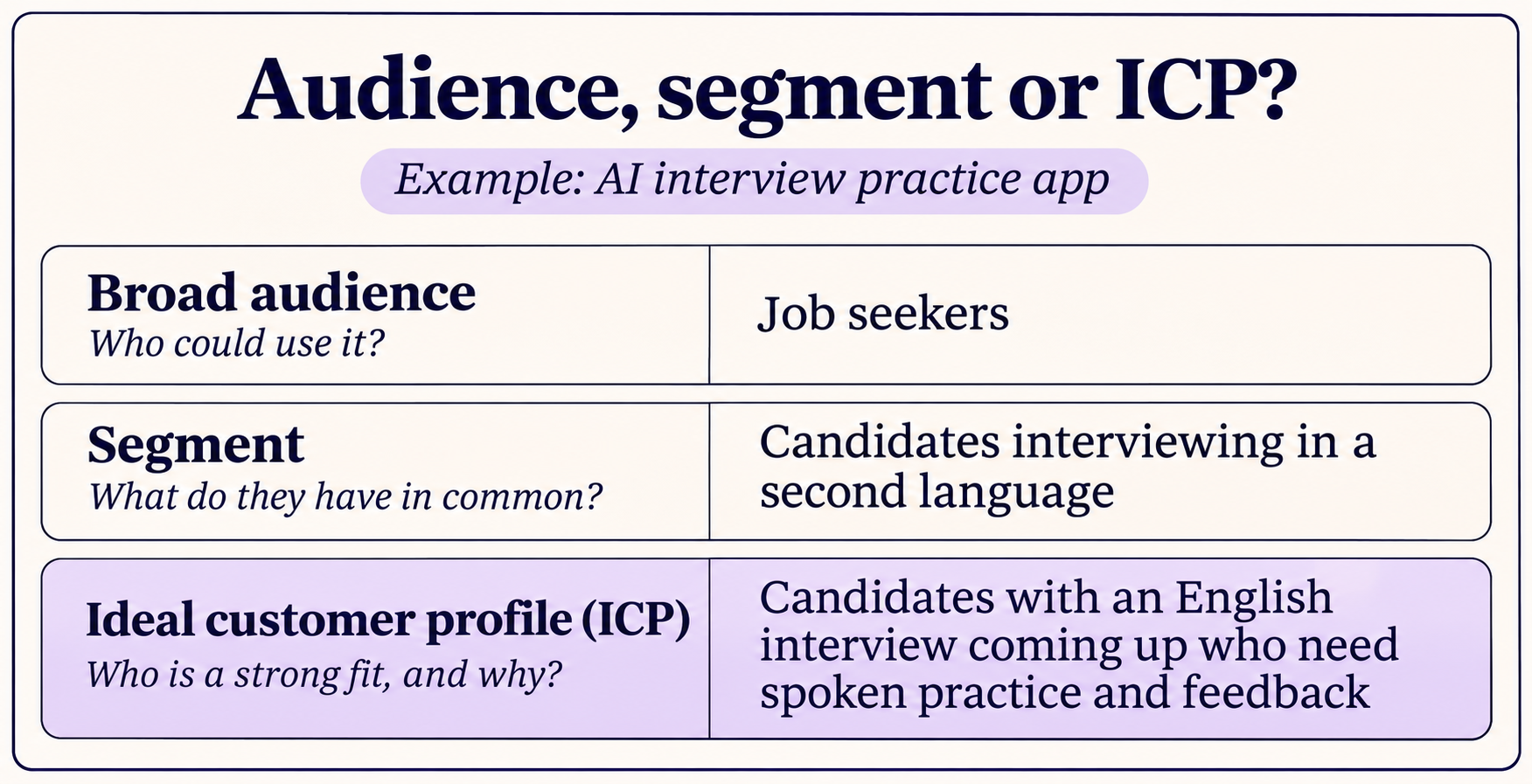
Small digital assets that start from a pain point
Quizzes, tools and template libraries work best when each one answers a pain point from the log. Choose the asset by the decision the avatar is making.
- "Which one is right for me?" A quiz helps the person narrow down the choice.
- "Is it worth it, or how much will it cost?" A calculator or tool gives them a number to decide with.
- "How do I do this?" A template library gives them a way to start.
Each asset should use the customer's words and lead to the matching solution.
Example scenario: finance software. A template library organised by use case, such as "closing the month across two entities", meets the avatar at the moment they are stuck. A library organised by product module asks them to know the product first.
Example scenario: a hair-care brand. A quiz that opens the free app on the journey the person chose keeps the thread going after the quiz ends.
For a worked example of a quiz read through its audience, see the Growplex quiz review.
Keeping the avatar current
An avatar card is a working document. Revisit it when acquisition sources change, when a new competitor appears, or when support themes shift.
The quiz article describes this as a journey loop. You find where the connection between promise, answers and next step weakens, make one change, check whether customers decide, then go back to the avatar and update it with what you learned.
Where to start this week
Pick one audience and one avatar. Collect ten phrases in their own words from at least two of the four sources. Map three pain points to the solutions you offer. Then choose the first touchpoint to check against them.
If you would like help with this research or with the journey it feeds, my work on website strategy and optimisation starts with visitor research, positioning and messaging.